ApplyMaskImage
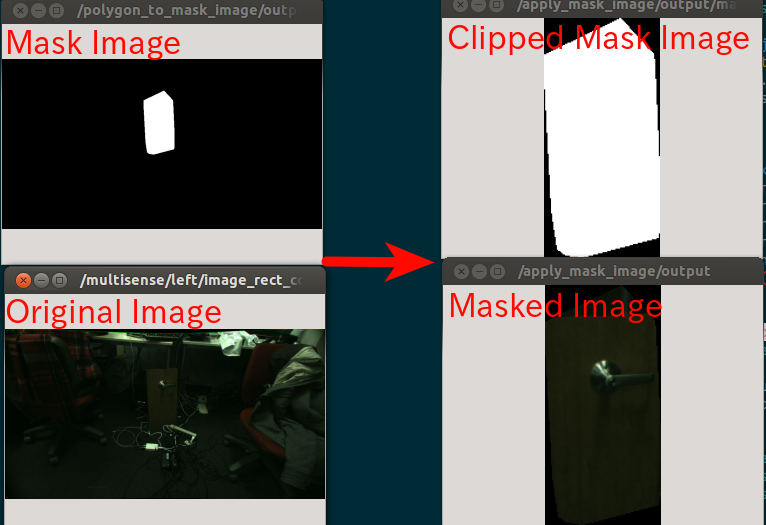
Apply mask image to original image and visualize it. It’s a utlity to visualize mask image.
Subscribing Topic
~input(sensor_msgs/Image)Original image.
~input/mask(sensor_msgs/Image)Mask image.
Publishing Topic
~output(sensor_msgs/Image)Masked image. The image is clipped by bounding box of mask image and filtered by the mask. The region not specified by mask image is filled by 0.
~output/mask(sensor_msgs/Image)Clipped mask image. The image is clipped by bounding box of mask image.
Parameters
~approximate_sync(Bool, default:false)Approximately synchronize inputs if it’s true.
~negative(Bool, default:false)Flip the max region of mask image or not.
~clip(Bool, default:true)Clip the max region of mask image or not.
~negative/before_clip(Bool, default:true)This decides order of negative and clip. If true, negative process is before clipping.
~queue_size(Int, default:100)How many messages you allow about the subscriber to keep in the queue. This should be big when there is much difference about delay between two topics.
~cval(Int, default:0)Used to fill image before masking with input image and mask.
~mask_black_to_transparent(Bool, default:false)Change black region of mask image to transparent and publish RGBA8 image as
~outputif its’ true.
Sample
roslaunch jsk_perception sample_apply_mask_image.launch